Evaluation of the CTI firmware on the Raspberry Pi Pico for a LabVIEW-based safe demonstrator

Macit Ortak (intern)
Introduction
VI Technologies provides LabVIEW training courses. These courses currently do not include physical hardware, because official NI hardware is expensive. GCentral has created firmware for the Raspberry Pi Pico via their Community Training Initiative (CTI) to provide a lower-cost alternative. This setup consists of firmware for the Raspberry Pi Pico and a LabVIEW driver package for your development environment that provides the interface to control the Pico.
The goal of my internship was to evaluate the suitability of CTI Firmware using the Raspberry Pi Pico. The main question was: “Is the CTI firmware on a Raspberry Pi Pico truly viable for interactive, hardware-based training courses”.
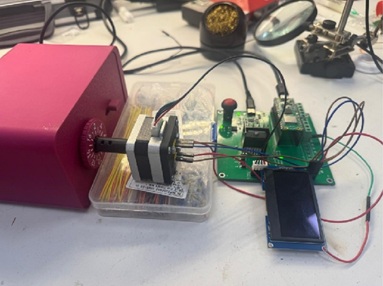
To test this properly, I wanted to move beyond basic "blink an LED" examples. I decided to build a complete physical testbed: an automated, 3D-printed safe that cracks its own combination lock by turning a dial to three numbers.
Building the setup
To bring the safe setup to life, I worked across mechanics, electronics, and software:
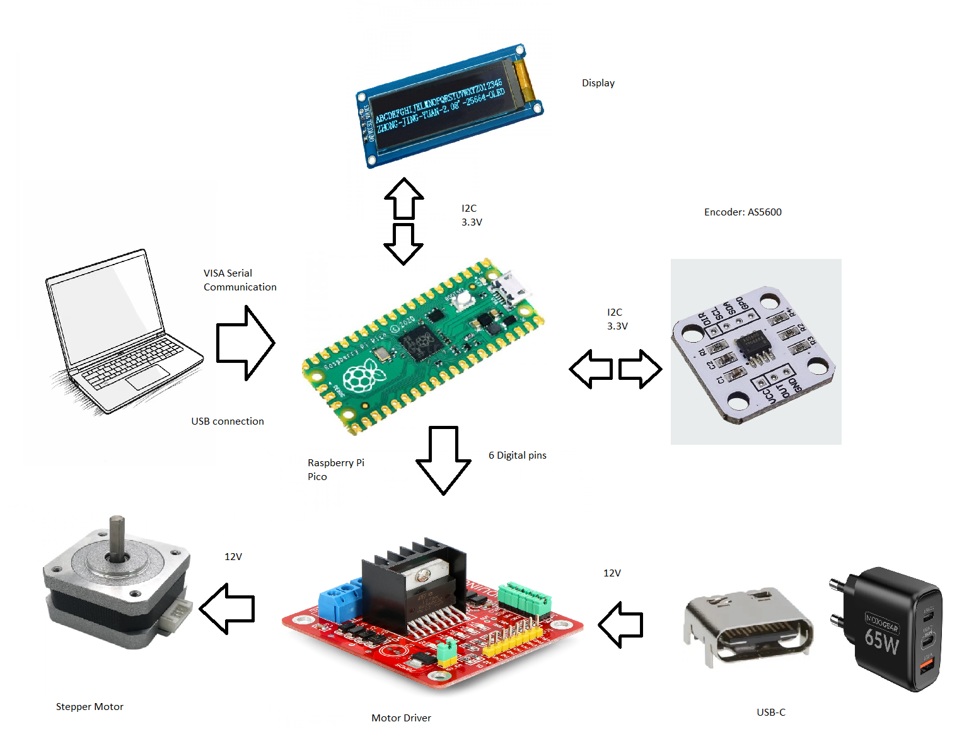
- Mechanics: A 3D-printed safe mechanism driven by a stepper motor, with a magnetic encoder for precise position feedback.
- Electronics: I designed a custom board to neatly combine the Raspberry Pi Pico, USB-C power delivery, motor drivers, status LEDs, and connection terminals for external sensors.
- Software Architecture: Developed entirely in LabVIEW using a JKI State Machine communicating with the Pico over the CTI driver interface.
Testing and Results
Once everything was assembled and wired up, I ran a series of tests to see how the Pico handled real-world control tasks:
- Reliability: The demonstrator successfully opened the safe 10 times in a row without missing a step, averaging 21.87 seconds per run.
- Control: The Pico handled homing, bidirectional motor control, reading the encoder positions, and updating the status LEDs without hiccups.
Challenges
Working with open-source community tools was a great experience, but it also came with a few practical challenges:
- Firmware Bugfixes: I ran into a few bugs in the CTI firmware related to PWM signals. I tracked down the issues, fixed them, and contributed the patches back to the GCentral CTI GitHub repository so others can use them.
- Speed Limits: Because LabVIEW commands need to be translated by the Pico firmware, it isn't meant for high-speed deterministic control like FPGA-based hardware. However, for training exercises, the speed is more than enough.
- Hardware Tweaks: Testing the first prototype showed that the emergency stop circuit and voltage monitoring could use some improvements—valuable lessons for a second PCB revision.
Conclusion
Overall, running CTI firmware on the Raspberry Pi Pico proved to be a practical, low-cost solution for beginner and intermediate LabVIEW training. It won't replace high-end NI DAQ devices for demanding industrial tasks, but it is a fantastic platform for learning core concepts like state machines, sensor integration, PWM actuation, and I2C communication without a large hardware budget.